Introduction
In the age of information and technological advancement, the security of a website cannot be overemphasized. It only then makes sense that as threats in the cyber world change, so do our security measures.
Among useful tools in combating cyber assault, HTTP Public Key Pinning (HPKP) is an effective one. In this post, you will learn more about HPKP, why it is helpful, and how it enhances your website’s defenses in 2024 and beyond.
HPKP is a security feature to Safeguard Websites from Fake SSL/TLS certificates. This is done by providing the capability for a website to define which of these public keys should be used with the SSL/TLS connections of the website.
It also shields the users from man-in-the-middle attacks as well as protects the intended data from unauthorized users.
What is HTTP Public Key Pinning?
HTTP Public Key Pinning is a method that has been developed in order to enable websites to avoid being mimicked by attackers who have access to fake SSL/TLS certificates. This is the general working for Mutual SSL it delivers from a set of Public Keys to the client side browser where the browser relates the public keys to the site for a set time.
How HPKP Works?
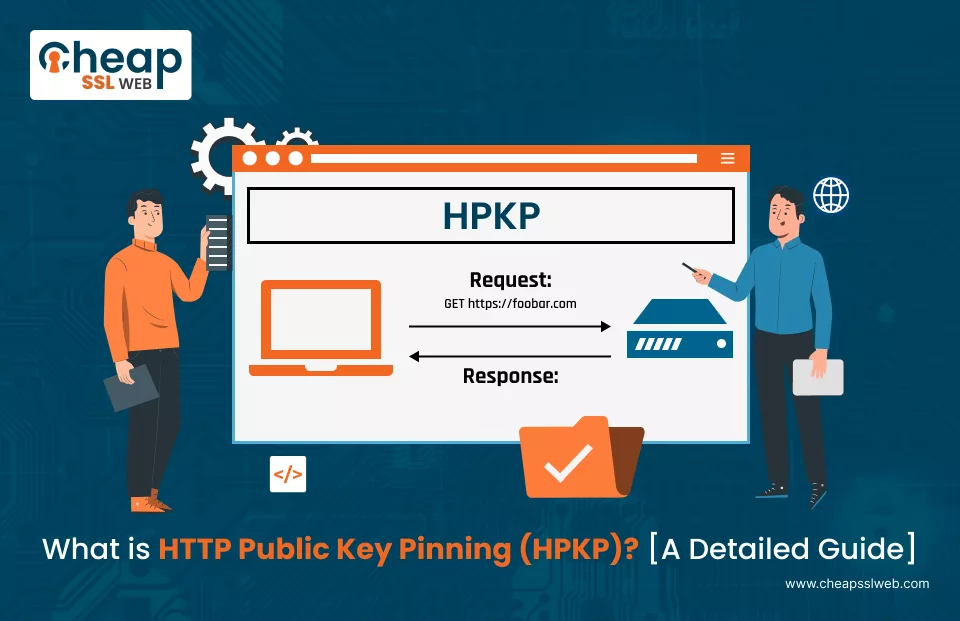
When a user comes to a site using HPKP, the server sends a special HTTP header to the client. This is a list of public key hashes, contained in the above-listed header. These hashes mean the public keys that this website has to have for SSL/TLS certificate.
The browser retains these hashes and links to the website. In subsequent visits, the browser has to verify the integrity whether the SSL/TLS certificate that is to be generated from the server matches one of the pinned public keys. If it doesn’t match, the browser declines the connection – this helps to save the user from dangerous attacks.
Benefits of HTTP Public Key Pinning
Enhanced Security:
In addition to the actual protection against man-in-the-middle attacks and fraudulent certificates HPKP builds an additional layer of security.
Trust Establishment:
It also assists in building a very strong basic trust relationship between the website and the browsers of its users.
Early Detection:
HPKP can identify and block such an attack before data has been stolen.
Customizable:
Website owners can select specific public keys to deem trustworthy and on what approximate time frame.
Mitigation of CA Compromises:
CSP can defend against the case when a CA has been violated, as the attacker still has to possess the proper private key.
User Confidence:
The instantiation of HPKP can show users that security is a priority of the website and may build trust with the users.
Implementing HPKP
To implement HPKP, website owners need to:
- Regenerate Public key hashes of their SSL/TLS certificates.
- Start making an HPKP policy where you can mention the required Hashes and other characteristics.
- Install the HPKP header whenever their web server responds with an HTTPS request.
HPKP needs to be implemented carefully. They are prone to becoming inaccessible when the pinned keys are either lost or are simply no longer valid. Although HPKP can be very effective in increasing levels of security, the approach is often seen as best practice.
As organizations develop their security policies, the first step is to implement basic security measures before moving to HPKP.
Best Practices for HPKP Implementation
- Start with a report-only policy to test your configuration.
- Use backup keys in your policy to prevent lockouts.
- Set reasonable pin lifetimes to balance security and flexibility.
- Monitor your HPKP reports to detect potential issues early.
- Implement a robust key management process to ensure pinned keys are never lost.
- Consider using a combination of different certificate types in your pin set for added resilience.
- Regularly review and update your HPKP policy to ensure it aligns with current best practices and your organization’s needs.
Challenges and Considerations
While HPKP offers significant security benefits, it also comes with challenges:
- Complexity: HPKP involves the implementation of many technical features, meaning its management cannot be obtained without adequate knowledge of the field.
- Risk of Lockout: The improper configuration results in website unavailability.
- Limited Browser Support: HPKP is not supported on all browsers.
- Potential for Abuse: There is a big potential that HPKP could be used by attackers for the creation of long-lasting DoS.
- Organizational Complexity: Integrating HPKP could ask for synchronization of efforts from different departments (security and development) in expansive enterprises.
Testing HPKP Implementation
Before fully implementing HPKP, it’s crucial to test thoroughly:
- Activate the report-only mode to find any conceivable issues.
- Check how different browsers render the HPKP configuration.
- Emulate change of certificates to ensure the effectiveness of backup pins.
- Examine your policy using web-based HPKP validators.
- Carry out a penetration test to confirm the success of your HPKP setup.
- Use browser toolsets to check the HPKP headers and validate the correct setup.
Monitoring and Maintaining HPKP
To successfully implement HPKP regular monitors are vital. Website owners should:
- Establish an alert destination for collecting information about violations.
- Examine logs continuously for signs of issues or strikes.
- Change pinned keys before their expiration to stop service issues.
- Open a system to instantly refresh pins if the situation arises.
- Execute ongoing security evaluations that cover the revision of HPKP parameters.
- Create notification systems to alert the security team regarding any HPKP problems or changes in policy.
HPKP vs. Other Security Measures
HPKP complements other web security measures like:
- HTTPS: Even though HTTPS encrypts information effectively HPKP makes sure that encryption keys are trustworthy.
- Certificate Transparency: HPKP takes steps to prevent the use of insecure certificates by streaming certificate issuances through CT logging.
- DANE: They both seek to strengthen DNS operations, however HPKP functions on an HTTP level.
- Content Security Policy (CSP): Although CSP protects websites from injection attacks, HPKP concentrates on ensuring the solidity of the SSL/TLS framework.
Future and Intergartion
Limited adoption of HPKP occurs because its complexities and possible risks pose challenges. Thus, more popular alternatives like Expect-CT and Certificate Transparency are emerging. Even though the correct setup is essential for high-security sites to utilize HPKP effectively.
While facing these obstacles, HPKP continues to be an important asset in unique high-security fields including banks or government agencies where the gains exceed the conceivable dangers and management difficulties.
Public Key Pinning and Website Performance
Applying HPKP does not make a noticeable difference in website performance. The smaller header associated with HTTPS responses minimizes the increase in load times. Yet the validation done by browsers might cause a small lag during the initial connection.
A few websites adopt HPKP for key pages that manage confidential information to keep performance intact.
HPKP for E-commerce Websites
From an e-commerce standpoint focused on customer and financial details HPKP enhances the level of security. It defends against assaults that potentially endanger client details or support misleading deals.
It is important for online shops evaluating HPKP to assess the safety gains and the chance of affecting service. An intentional plan to implement may use non-significant domains to mitigate these concerns.
HPKP and Mobile Apps
Mobile apps may employ HPKP for securing the connections between APIs. It safeguards against middleman assaults on smartphones that are more at risk for these dangers.
In applying HPKP to mobile applications developers must account for the difficulties of updating pinned keys in already deployed apps. To ensure adaptability methods such as mobile configuration or routine updates may prove vital.
HPKP and Compliance
In regulated industries, HPKP aids businesses in fulfilling security compliance standards. It illustrates a self-driven strategy for securing private data and blocking unauthorized entry.
Although HPKP aids in meeting compliance needs, many regulations do not require its implementation. Consulting compliance specialists allow organizations to learn about the relationship of HPKP within their overall compliance framework.
HPKP and Content Delivery Networks
Applying HPKP to CDNs needs a deliberate strategy. The SSL/TLS certificates held by the CDN should be present in the pin set for website owners. Specific CDNs implement HPKP features reducing the effort for their patrons.
A number of groups settle on implementing HPKP at the origin server level to keep management straightforward and defend essential resources.
HPKP for Subdomains
The includeSubDomains directive permits you to adapt HPKP to subdomains. Protection covers every subdomain as a result; however, it needs meticulous supervision to stop locking out genuine subdomains.
An organized inventory of both the subdomains and their configurations is necessary for using HPKP to stop accidental lockouts of subdomains.
HPKP and Wildcard Certificates
HPKP is compatible with wildcard certificates; still, extra diligence is needed. The policy requires that it contains pin information for the wildcard certificate along with specific subdomain certificates.
Various experts urge not to pair HPKP with wildcard certificates because of the elevated risks and difficulty involved. Each company must review this balance regarding their specific objectives and expertise.
HPKP and SSL/TLS Certificate Rotation
Recurring certificate changes should be regarded as an essential security measure.
With HPKP, it’s important to plan rotations carefully:
- Place the public key associated with the new certificate in the pin set at the time of deployment.
- Utilize the old certificate’s key in the pin set during the time set by the max-age.
- Throw away expired keys from the set after they are no longer needed.
Numerous organizations deploy automated methods for overseeing certificate rotation and HPKP updates to minimize human errors in this important operation.
HPKP in Multi-Server Environments
Implementing HPKP in environments with multiple servers requires coordination:
- Every server should adopt certificates with keys embedded in the PIN set.
- All servers must receive the HPKP policy updates at the same time.
- Analyzing a key management approach may improve overall effectiveness.
Roll out HPKP in a multi-server scenario by gradually activating fewer priority systems initially to learn and refine procedures before it is rolled out to vital systems.
HPKP and DevOps Practices
Integrating HPKP into DevOps workflows can help manage it more effectively:
- Programmatically create and update keys and policies.
- Add checks for HPKP within your continuous integration systems.
- Administrating HPKP configurations in multiple environments with a code-based approach is helpful.
- To protect key management processes from various failure scenarios injecting HPKP into disaster recovery and business continuity proposals is indispensable.
HPKP and Browser Caching
Cache durations of HPKP policies are set by the max-age directive that browsers follow. Performance enhances while prompt implementation of policy changes isn’t guaranteed for everyone. When you modify your HPKP policy ensure you take the necessary preparations.
Conclusion
This tool enhances the security of corresponding websites. Although it needs thorough implementation the advantages can prove to be substantial for secure websites. To maintain a secure online presence in an ever-changing digital environment you need to be knowledgeable about security methods like HPKP.
Regardless of whether you adopt HPKP or investigate other Encryption solutions, you must prioritize actions to enhance website protection and secure your users’ information. Learning the details and merits of HPKP enhances your ability to decide on a strong security strategy for your website.
Alternatives to HPKP
For those concerned about the risks of HPKP, alternatives include:
- Expect-CT: Imposes Certificate Transparency without the perils tied to key pinning.
- DANE: Confirms TLS certificates using DNSSEC.
- CAA Records: Determines who has the right to provide certificates for a domain.
These solutions deliver portions of the effectiveness of HPKP without equally bearing higher risks and increased complexity. It is crucial to assess various options within your particular security constraints and technical abilities.
FAQs
Is HPKP suitable for all websites?
Websites that safeguard critical information typically enjoy the greatest benefits from HPKP. For several sites, other options like Expect-CT could be better because of their reduced chances of issues.
How long should I set the max-age for my HPKP policy?
The proper max-age varies according to your unique circumstances. The standard beginning value is 60 days (about 2 months). Shorter lengths cut risks while demanding increased updates.
Can I use HPKP with free SSL certificates?
Any genuine SSL/TLS certificate can be paired with HPKP including the free varieties. Make sure your certificate issuer allows for simple key updates.
What happens if I lose my pinned keys?
Without all key pins and the related HPKP policy in place, you will face limited accessibility for your site from returning visitors. Back up your keys whenever you can for self-defense.
How does HPKP affect website loading speed?
The speed at which the site loads is not significantly affected by HPKP. On the whole, users seldom encounter major delays due to the small extra header and authentication steps.

Secure your Website with SSL
Enables an Encrypted Connection between Website and Browser Using Trusted SSL Certificate Encryption!
Starts at Just $3.99/Yr