Wildcard certificates make it easy to manage certificates when there is a need for HTTPS for multiple subdomains. Instead of having to request and renew individual certificates for each host, it is enough to get a wildcard certificate like *.example.com, which secures many of the first-level subdomains of the specified domain.
However, there is a critical requirement for all wildcard certificates, which is ACME DNS-01 validation. While HTTP-01 and TLS-ALPN-01 are methods that establish domain control through domain ownership verification, DNS-01 requires a user to create a certain TXT record in the DNS zone.
This is suitable for wildcard certificates, private services, mail servers, APIs, and other infrastructure that does not allow the creation of a public web server.
This guide will tell you how the ACME DNS-01 challenge works, how to configure it using Certbot, how to automate TXT record management, and how to eliminate most of the validation problems.
What is the ACME DNS-01 Challenge?
The DNS-01 challenge is a method of domain validation using the ACME protocol by which it is verified that a domain is controlled by an entity.
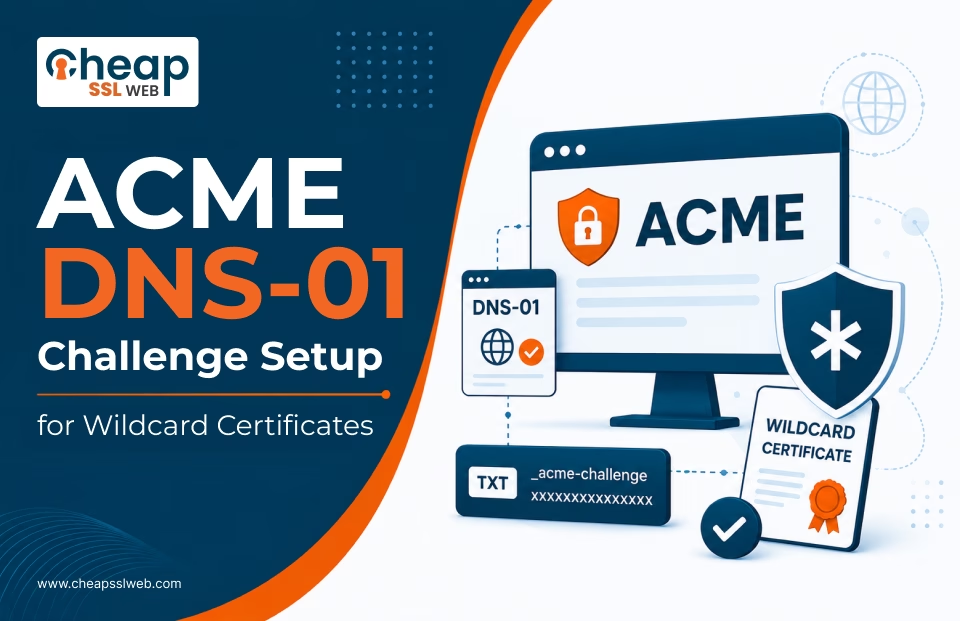
When requesting a certificate, the ACME client receives the unique validation token provided by the Certificate Authority (CA). Once received, the client creates a TXT record for: _acme-challenge.example.com
The CA looks for the TXT record in DNS. If found, this establishes domain control by the entity, and the CA is able to issue the certificate.
The process is basic as follows:
- The certificate is requested with an ACME client;
- The CA provides the DNS-01 challenge;
- The ACME client provides the necessary TXT value;
- The client/administrator creates a DNS TXT record;
- The CA verifies DNS TXT record in the DNS system;
- The CA confirms domain control;
- A certificate is issued;
- A temporary TXT record is deleted by the ACME client.
In automated DNS plugins, steps 3 and 4 are done via the API of your DNS provider without any manual intervention.
Why Does a Wildcard Certificate Require DNS-01?
Wildcard Certificates allow for multiple subdomains to be covered by a single certificate. For instance: *.example.com can cover:
- www.example.com
- api.example.com
- mail.example.com
- app.example.com
- vpn.example.com
However, it does not cover:
- example.com
- api.dev.example.com
The apex domain must be explicitly included, while multi-level subdomains require their own wildcard name.
For example, you can request: example.com and *.example.com in the same certificate.
The ACME protocol requires DNS-based validation for wildcard issuance. Therefore, DNS-01 is the standard approach when you need a certificate for subdomains.
HTTP-01 and TLS-ALPN-01 cannot validate wildcard certificate requests.
How Does ACME DNS-01 Validation Work?
The DNS-01 validation flow involves three primary components:
- ACME client: Certbot, acme.sh, lego, or another compatible client
- Certificate Authority: Such as Let’s Encrypt or a commercial ACME-compatible CA like Sectigo or DigiCert
- DNS provider: Cloudflare, Amazon Route 53, Google Cloud DNS, Azure DNS, DigitalOcean, or another supported provider
The workflow is:
ACME client → DNS provider API → TXT record → CA DNS lookup → Domain validation → Certificate issuance
For example, when requesting a wildcard certificate for *.example.com, the ACME client may create: _acme-challenge.example.com TXT “validation-token”
The certificate authority first searches for the record. If the token used matches the challenge, the certificate authority verifies control of the domain.
This method is greatly advantageous compared to the HTTP-based method. The certificate authority does not need to open either port 80 or port 443 for the validation process.
When Should You Use DNS-01?
DNS-01 works particularly well in environments where HTTP-01 is inconvenient or impossible.
Consider DNS-01 when you need:
- Wildcard certificates
- Certificates for mail or VPN services
- Certificates for APIs without public web servers
- Certificates for private infrastructure
- Multi-cloud deployments
- Services behind NAT or firewalls
- Certificates for multiple subdomains
- Centralised certificate management
- Automated certificate issuance across large environments
DNS-01 can simplify the task of managing certificates for businesses with multiple interconnected subdomains. Wildcard certificates can eliminate the need for distinct individual certificates for every service domain.
Despite the fact that using DNS-01 takes simplification a step forward by requiring the use of DNS API credentials, it creates a condition of considerable security concern.
This is because someone with access to the credentials has the ability to change the DNS record configuration, and there is a real chance that your domain can be hacked. That said, the DNS API permissions must meet the principle of least privilege on an ongoing basis.
How Do You Set Up Certbot for DNS-01?
Certbot is one of the most renowned ACME clients. It has an advantage in DNS-01 validation automation by virtue of the installation of a DNS plugin that links Certbot to the DNS provider.
Popular integrations include:
| DNS Provider | Certbot Integration | Authentication |
| Cloudflare | certbot-dns-cloudflare | Scoped API token |
| Amazon Route 53 | certbot-dns-route53 | IAM role or credentials |
| Google Cloud DNS | certbot-dns-google | Service account |
| Azure DNS | certbot-dns-azure | Managed identity or service principal |
| DigitalOcean | certbot-dns-digitalocean | API token |
| OVH | certbot-dns-ovh | Application credentials |
The exact installation method depends on your operating system and Certbot installation method.
For example, a Cloudflare-based setup may use a credentials file containing a scoped API token:
dns_cloudflare_api_token = YOUR_API_TOKENProtect the file carefully:
chmod 600 /etc/letsencrypt/cloudflare.ini
chown root:root /etc/letsencrypt/cloudflare.ini
The credentials should never be world-readable or embedded directly into scripts that are accessible to other users.
How Do You Request a Wildcard Certificate with Cloudflare?
After installing the appropriate Certbot DNS plugin and configuring your API credentials, you can request a wildcard certificate.
For example:
sudo certbot certonly \
  --dns-cloudflare \
  --dns-cloudflare-credentials /etc/letsencrypt/cloudflare.ini \
  --dns-cloudflare-propagation-seconds 30 \
  -d "*.example.com" \
  -d "example.com"
This request includes both:
- *.example.com — wildcard coverage for first-level subdomains
- example.com — apex domain coverage
Certbot communicates with Cloudflare through the API, creates the required DNS TXT record, waits for propagation, and allows the CA to validate the challenge.
After successful validation, Certbot stores the certificate and private key locally. Typical paths include:
/etc/letsencrypt/live/example.com/fullchain.pem
/etc/letsencrypt/live/example.com/privkey.pem
These paths are commonly symlinks managed by Certbot. Your web server or reverse proxy can reference them directly, while Certbot updates the underlying certificate during renewal.
How Does Manual DNS-01 Validation Work?
If your DNS provider does not have a suitable plugin, you can complete DNS-01 validation manually.
Start a request such as:
sudo certbot certonly \
  --manual \
  --preferred-challenges dns \
  -d example.com \
  -d "*.example.com"
Certbot will display a TXT record that you need to publish.
For example:
_acme-challenge.example.com
TXT
“validation-token”
Add the record through your DNS provider’s control panel.
Before continuing, check whether the record is visible:
dig TXT _acme-challenge.example.com +shortYou can also query a public resolver:
dig TXT _acme-challenge.example.com @8.8.8.8Once the record is available, continue the Certbot process.
Manual validation can work for occasional certificate issuance. However, it is generally unsuitable for large-scale automation because you must repeat the DNS process during future renewals.
Why Should You Automate DNS-01 Validation?
Let’s Encrypt certificates have relatively short lifetimes, so manually creating TXT records for every renewal quickly becomes operationally inefficient.
Automated DNS plugins allow the ACME client to:
- Create the TXT record
- Wait for DNS propagation
- Complete CA validation
- Obtain the certificate
- Remove the challenge record
The process can then repeat automatically when renewal is required.
This is particularly valuable for organisations managing:
- Multiple wildcard certificates
- Hundreds of domains
- Multi-cloud environments
- Kubernetes clusters
- Large reverse-proxy deployments
- Internal application infrastructure
For large environments, centralized certificate automation can also reduce the number of systems that require direct DNS API access.
How Do You Use acme.sh for DNS-01?
Certbot is not the only option. acme.sh provides another popular ACME client with broad DNS provider support.
A typical wildcard request may look like:
acme.sh --issue \
  --dns dns_cf \
  -d example.com \
  -d "*.example.com"
The exact DNS provider identifier depends on your provider.
acme.sh can also install the resulting certificate and execute a reload command:
acme.sh --install-cert -d "*.example.com" \
  --key-file /etc/ssl/private/example.com.key \
  --fullchain-file /etc/ssl/certs/example.com.pem \
  --reloadcmd "systemctl reload nginx"
This makes it possible to automate the complete lifecycle: Issue → Validate → Install → Reload → Renew
For environments where a suitable Certbot DNS plugin is unavailable, acme.sh may provide a practical alternative.
How Do You Configure DNS-01 with Kubernetes?
Kubernetes environments commonly use cert-manager to automate ACME certificate issuance.
A ClusterIssuer can be configured with a DNS-01 solver for your DNS provider. You can then request a wildcard certificate as a Kubernetes Certificate resource.
A simplified certificate definition might look like:
apiVersion: cert-manager.io/v1
kind: Certificate
metadata:
  name: wildcard-example-com
spec:
  secretName: wildcard-example-com-tls
  issuerRef:
    name: letsencrypt-dns01
    kind: ClusterIssuer
  dnsNames:
    - "*.example.com"
    - "example.com"
cert-manager automates the ACME process, resulting in the received certificate being kept in a Kubernetes Secret.
This process is especially suitable for containerized environments, in which certification operation and renewal are fully integrated into cluster automation.
Nevertheless, DNS credentials protection should be implemented. Whenever possible, limited-access credentials should be used, preventing sharing of powerful DNS credentials among various workloads.
How Should You Secure DNS API Credentials?
DNS-01 automation depends on credentials that can modify DNS records. Therefore, credential security should be a core part of your implementation.
Follow these practices:
Use Scoped Credentials
Avoid global DNS API keys whenever your provider supports scoped tokens.
For example, restrict a token to:
- Specific DNS zones
- DNS record modification only
- The certificate automation system
Do not grant unnecessary account-wide permissions.
Protect Credential Files
Use restrictive permissions: chmod 600 credentials.ini
Where appropriate, ensure the file belongs to the account running Certbot: chown root:root credentials.ini
Rotate Credentials
Create a documented rotation process:
- Generate a new credential.
- Update the automation system.
- Test certificate issuance or renewal.
- Confirm successful operation.
- Revoke the previous credential.
- Record the change.
Enable Audit Logging
Make use of the audit functionality offered by your DNS provider that allows you to track changes made to DNS records.
This can help identify:
- Changes made in the TXT records without proper authorization
- Improper usage of credentials
- Changes made to the DNS records without authorization
- Failure in automation processes
It is important to understand that DNS-01 automation plays a key role in your security, and it’s not a simple certificate installation activity.
What Are the Most Common DNS-01 Problems?
DNS Propagation Delays
The most frequent issue is working with a CA that can’t view the TXT record just yet.
Confirm whether the record exists using:
dig TXT _acme-challenge.example.com @8.8.8.8If you can’t find it, lengthen the duration configured for your DNS plugin.
It would be best if you did not make any assumptions regarding a DNS provider’s speed of propagation for the records. Enough time should be provided before the DNS changes become visible to the CA in the process.
Incorrect API Permissions
- If proper credentials are missing, a DNS plugin won’t work.
- Be sure to know if the account/token is configured to possess the required DNS permissions.
Missing DNS Plugin
Certbot shows an unknown –dns-* option, which means the plugin in question might not be installed or reachable by Certbot.
To verify this, check available plugins with: certbot plugins
Then, install the necessary DNS plugin.
Outdated TXT Records
After the validation process has been interrupted, there is a possibility that stale records could be left behind.
To verify what records are current, perform the following:
dig TXT _acme-challenge.example.comEliminate stale records that are no longer needed, but do not interfere with records required for the operation of another active ACME process.
Split-Horizon DNS
In a business, there may be internal and external DNS domains.
The ACME CA validates its operation through publicly authorized DNS services, hence making sure that the challenge record is available via authorized public DNS for validation.
CAA Limitations
CAA records provide a way for limiting which certificate authority can issue certificates for a particular domain.
If the CAA record is part of the DNS configuration, it is important to be sure that the selected CA can issue certificates.
For Let’s Encrypt, a CAA record may include: 0 issue “letsencrypt.org”
Check your current configuration with: dig CAA example.com
Rate Limits
Repeated certificate requests can trigger CA rate limits, particularly during testing or failed automation deployments.
Use a staging environment while developing your automation:
certbot certonly \
  --staging \
  --dns-cloudflare \
  --dns-cloudflare-credentials /etc/letsencrypt/cloudflare.ini \
  -d example.com
The use of staging certificates is not accepted by browsers but offers the opportunity to test quantities related to the use of the ACME processes.
How Do You Automate Certificate Renewal?
Once DNS-01 automation has been confirmed, the renewal process must be automated to the maximum level.
Certbot will make checks on certificates that it manages. If Certbot notices that a certificate is near expiry, it will make attempts to renew it. You can run:
sudo certbot renew --dry-runThis is an important production readiness test because it validates the renewal workflow without replacing your live certificate.
For deployments using Nginx, you can reload the service after successful renewal:
sudo certbot renew \
  --deploy-hook "systemctl reload nginx"
The deploy hook makes it possible for the server to reload and accept a new certificate after successful renewal.
If you are using other platforms, similar reload or deploy commands exist.
If you want to stay protected in relation to all production environments, it is important to monitor the automatic renewal process since it may fail due to API credential invalidation problems, DNS provider failures, permission problems, or network issues.
How Can You Monitor DNS-01 Certificate Renewals?
A robust certificate management strategy should include:
- Certificate expiry monitoring
- Renewal success monitoring
- Failed renewal alerts
- DNS API health monitoring
- Credential expiration tracking
- Certificate deployment verification
You can use tools such as Prometheus, Grafana, Gatus, or custom monitoring scripts to track certificate expiry.
For example, OpenSSL can inspect a certificate’s expiration information:
echo | openssl s_client \
  -connect app.example.com:443 \
  -servername app.example.com 2>/dev/null \
  | openssl x509 -noout -dates
Set alerts well before expiry. This gives your operations team enough time to investigate a failed renewal before the certificate becomes invalid.
DNS-01 vs HTTP-01: Which Challenge Should You Choose?
| Feature | DNS-01 | HTTP-01 |
| Wildcard certificates | Yes | No |
| Requires DNS API | Usually for automation | No |
| Requires public port 80 | No | Yes |
| Works for non-web services | Yes | No |
| Works behind firewalls/NAT | Yes | Often difficult |
| DNS propagation required | Yes | No |
| Automation complexity | Higher | Lower |
| Best for | Wildcards and complex infrastructure | Standard public websites |
If you only need a certificate for a simple public website, HTTP-01 may be easier to configure, but DNS-01 becomes preferable when wildcard certificates, private infrastructure, or certificates for services not able to expose HTTP endpoints are being obtained.
Best Practices for Production DNS-01 Automation
Before you start using your implementation, make sure to follow this checklist:
- Choose a trusted DNS service provider with stable API support.
- Use a compatible ACME client with DNS plugin.
- Request both apex and wildcard domains when needed.
- Use DNS API credentials with restricted scope.
- Ensure that the credentials are valid only for necessary domain sections.
- Keep them in a location with limited access rights.
- Check DNS propagation before issuing credentials.
- Do renewal tests in the ACME test environment.
- Run certbot renew –dry-run.
- Create deployment hooks for reloading the applications.
- Keep an eye on expiration dates.
- Receive notifications about renewal issues.
- Keep track of the performance of the DNS API.
- Enable logs for the DNS provider.
- Regularly update the API credentials.
- Establish a procedure for emergency renewals.
- Set up a rollback plan.
- Test your automation before using it on more domains.
Conclusion
ACME DNS-01 validation simplifies the process of managing wildcard certificates since it allows for automated validation of domains without the necessity of public HTTP endpoints.
As long as proper DNS parameters, appropriate API authorization, and the renewal process are in place, it is possible to guarantee an outstanding level of security for all subdomains while minimizing human influence on certificate lifecycle management.
Nevertheless, managing SSL/TLS certificates on a large scale can still be complicated due to the necessity of getting reliable SSL certificates using automation and obtaining continued support.
CheapSSLWeb can bring simplicity to customers in terms of meeting their SSL certificate needs by providing affordable solutions and professional advice.